Palm-Tech → SightSpec
Why inspectors switch from Palm‑Tech
Palmtech is the cheaper seat and it ships photo-reading AI — we'll say that plainly. Here's the difference that actually shows up on a bad-signal Tuesday.
01 · Compare the experience
Your Tuesday, before and after
Not a feature list — the same inspection day, run two ways.
02 · Switch day
Previewable, fast, reversible.
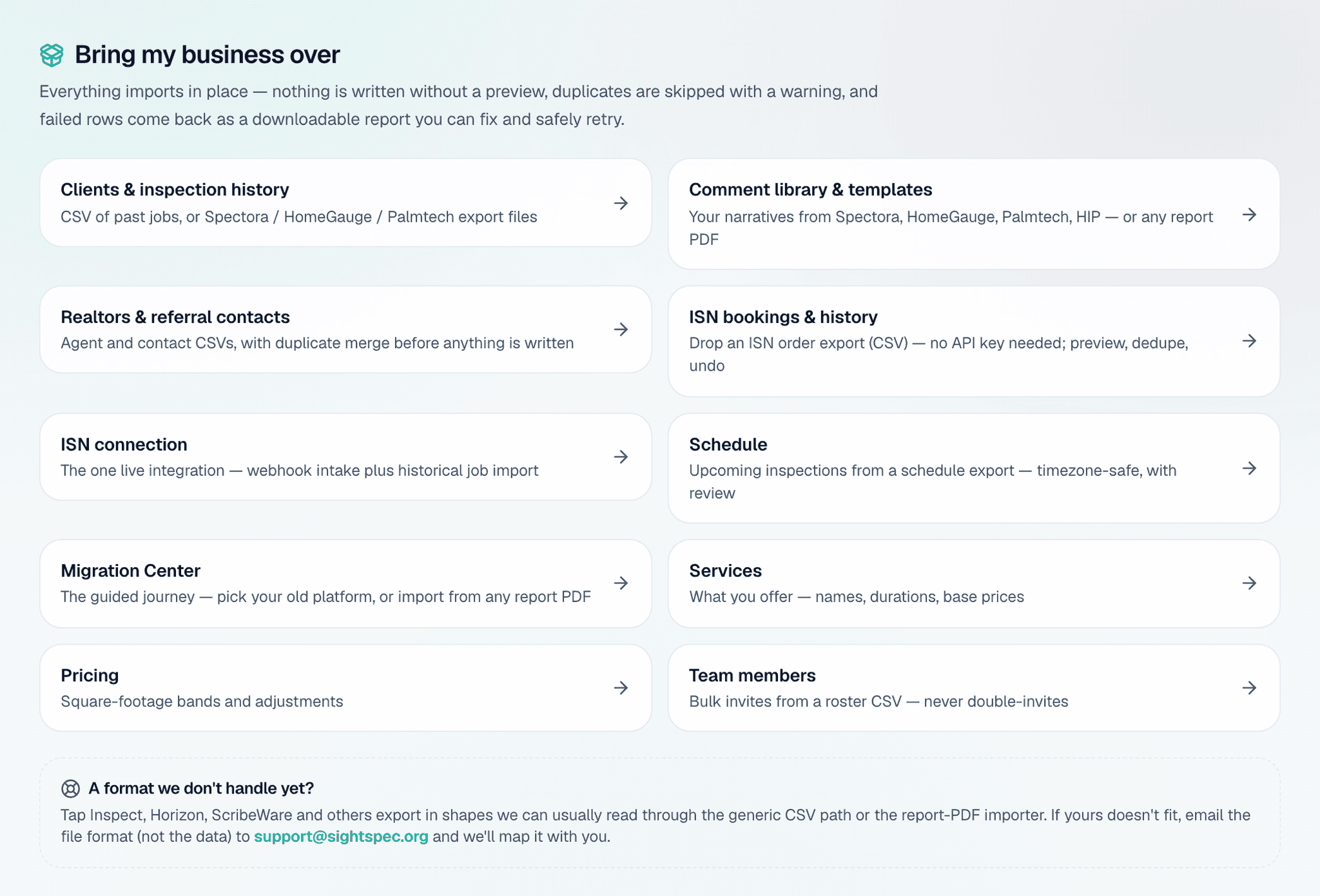
The things you'd be afraid to lose are exactly the things that come over.
- 1
Connect
Import your templates and comments — or drop any past report PDF and AI rebuilds your template + comment library for you to review.
- 2
Preview everything
Templates, comment library, clients, and schedule — you review every imported item before anything is saved.
- 3
Go live the same day
The guided flow takes about 5–8 minutes start to finish; most inspectors are fully moved the same day.
- 4
Roll back any time
Any import can be undone in one tap from your migration history. The decision stays reversible.
03 · After the switch
What your client sees now
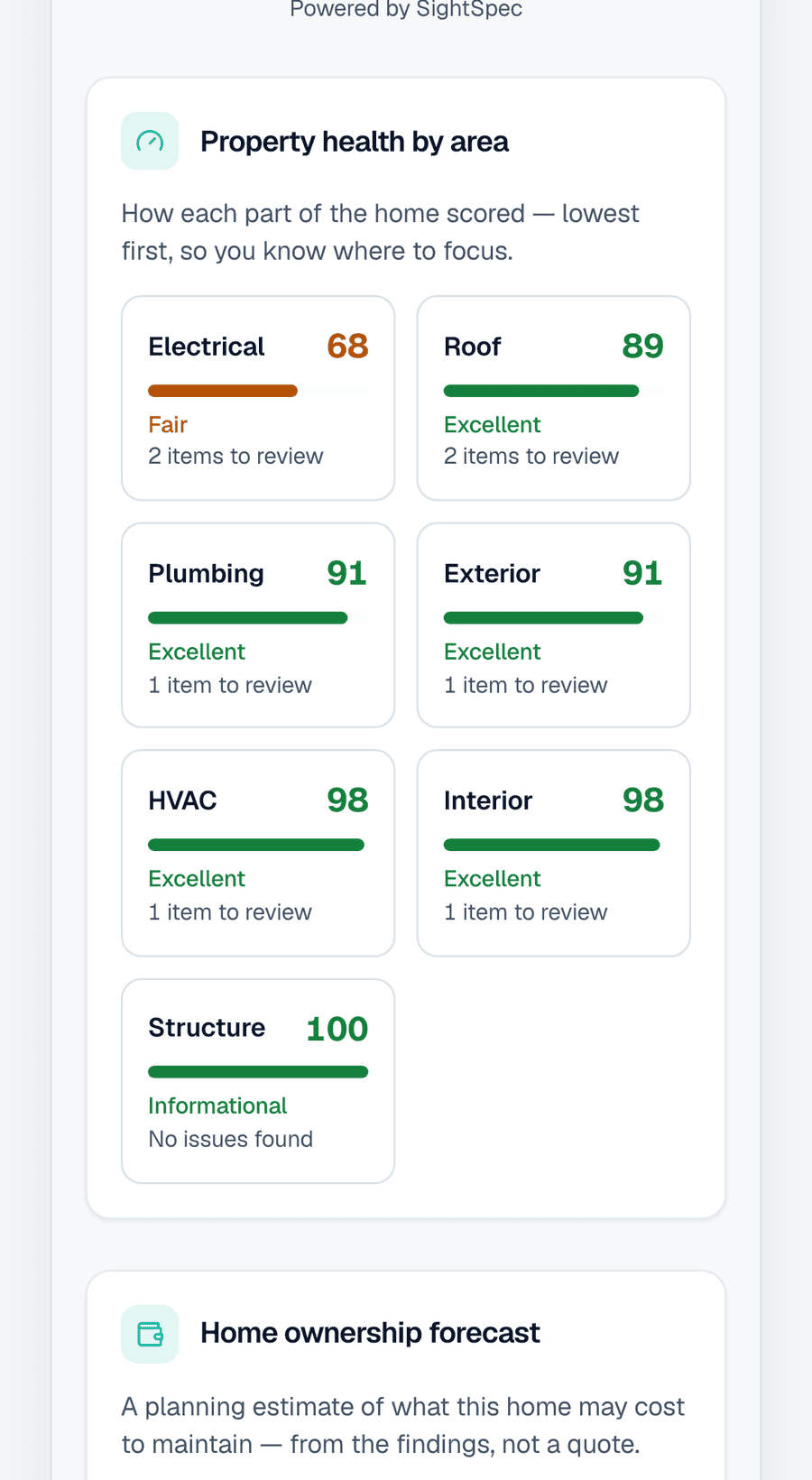
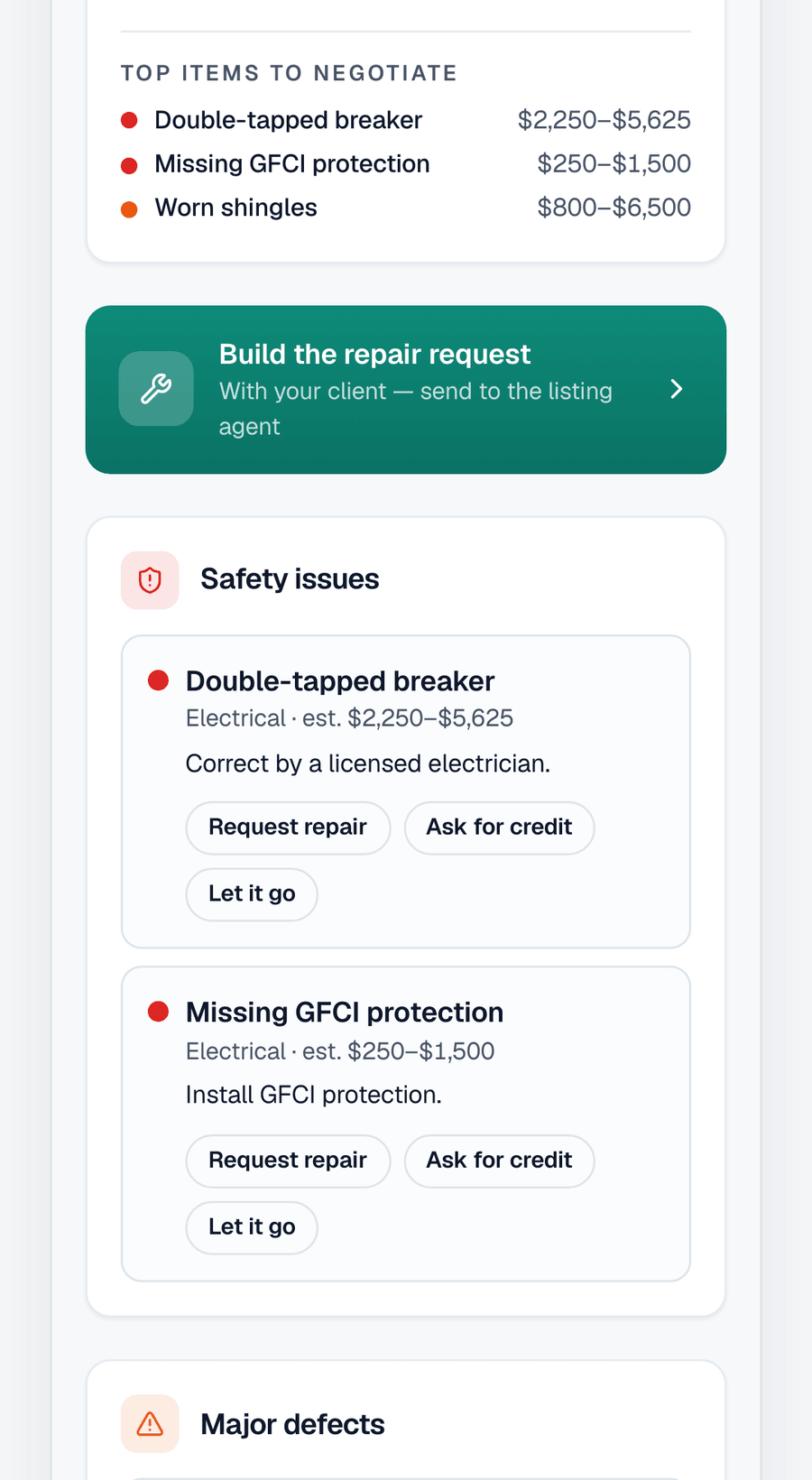
A live Property Health Score hub the buyer actually reads, and an agent brief that answers the deal questions — the report becomes the thing that wins your next referral, not an attachment that gets skimmed once.
And if we're ever wrong for you
Export everything — templates, comments, clients, reports — in one tap, anytime. The Data Freedom Guarantee is in writing, so the whole decision stays reversible, not just the import.
04 · Side by side
The honest comparison
Swipe sideways for the full table →
$79/mo, or $63/mo billed annually.
The whole platform on every paid plan; plans differ on volume and seats.
Offline-first; every capture saves on the device before anything leaves it.
The photo drafts the finding — title, description and severity.
PDF and web report plus a buyer hub scored area by area, delivered with no app or login.
Imports preview before they save and undo in one action.
Comparison reflects publicly documented capabilities as of 2026. Palm-Tech is a trademark of its owner; this page is for factual comparison only.
Features
Everything included, on a narrower platform
Depends on your businessPalmtech states that all pricing models include 100% of its features — there is no upsell tier to model, which is genuinely rare. The platform is narrower than the largest suites, but for a solo inspector 'nothing is held back' can be worth more than a longer list with gates in it.
- SightSpec
- One platform on every paid plan — offline-first field capture, desktop operations, AI drafting, PDF and web reports, and a scored buyer hub. Plans differ on volume and seats, not on capability.
- Palm-Tech
- All pricing models include 100% of Palmtech's features: report writer, online scheduler, agreements, payments, client and agent database, email templates, automated notifications and business reporting.
Pricing
Palmtech is the cheapest published seat on this list
Palm-Tech leads$50 per user per month, or $500 per user per year — roughly $42 a month — against SightSpec Pro at $79 monthly or $63 billed annually. Palmtech is cheaper per seat and includes every feature at that price. We would rather state that plainly than construct a comparison that hides it.
- SightSpec
- Solo is free; Pro is $79/month ($63/month billed annually); Team is $149 ($119 annual) with 3 seats and Scale $299 ($239 annual) with 8 seats. Additional inspectors are $39/month.
- Palm-Tech
- $50 per user per month, or $500 per user per year, with all features included in every pricing model. No hidden fees, free tech support, no charge for updates, cancel anytime.
Mobile workflow
Both write on the phone; the sync model differs
Depends on your businessPalmtech's writer runs on mobile with voice commands, photo and video capture and a media library, which is a real field workflow. Its Live Data Sync is what keeps devices consistent, and that requires a connection. Whether that matters depends on where you inspect.
- SightSpec
- Mobile-first: the whole inspection is completed on the phone — camera, voice and severity as you go — with no desktop step required to finish.
- Palm-Tech
- Voice commands for moving between report sections, photo and video capture and editing, a media library, line-level ratings, and a report designer — on mobile.
Reporting
Interactive reports with a request list on both sides
Depends on your businessPalmtech produces an interactive report with a request list builder, custom cover pages and a report designer for branding. SightSpec produces PDF and web reports plus a buyer hub scored area by area. Both are modern; the choice is about what the client receives afterwards.
- SightSpec
- Both deliverables from one inspection: a PDF report and a shareable web report, plus a buyer hub scored area by area, delivered branded with no app and no login.
- Palm-Tech
- Interactive report with a request list builder, automated report delivery, a report designer controlling featured images, ratings and summaries, and custom branded cover pages.
Scheduling
Comparable online booking on both sides
Evenly matchedPalmtech's online scheduler captures leads from your website with real-time pricing and availability and lets clients book while you are out; SightSpec ships online booking, drag-and-drop day lanes and a calendar feed. For a solo inspector these are close enough that neither should decide the purchase.
- SightSpec
- Drag-and-drop day lanes on the desktop schedule, online booking, and a subscribable calendar feed any calendar app can read.
- Palm-Tech
- An online scheduler capturing leads from the inspector's website, letting buyers and agents enter property details, select services and see real-time pricing and availability, plus calendar management and automated notifications.
AI
Both read the photograph
Evenly matchedThis one moved when we did the research. Palmtech ships an AI Image Defect Detector that detects issues in photos and drafts comments for review, plus an AI Comment Helper for text — the same shape of capability as ours, and we previously described it as 'basic AI assists'. That was unfair. On advertised AI capability this is a tie.
- SightSpec
- AI reads the photograph: a captured image drafts the finding's title, description and severity for you to accept, edit or undo. Voice notes become report writing. AI is included on every paid plan rather than metered per seat.
- Palm-Tech
- AI Image Defect Detector automatically detects issues in photos and drafts detailed comments the inspector can review and add, plus AI Comment Helper for AI-generated comment suggestions.
Offline
Palmtech's sync requires a connection; ours does not
SightSpec leadsPalmtech names Live Data Sync as its protection against data loss and marks it '(Internet connection required)'. SightSpec writes every capture to the device before anything leaves it, so losing signal costs nothing. If your worst days are crawlspaces and rural basements, this is the dimension that decides it.
- SightSpec
- Offline-first by construction: every capture is written to on-device storage and queued, so a field action completes with no network at all and replays when signal returns.
- Palm-Tech
- Live Data Sync protects against data loss and keeps devices up to date, and is marked as requiring an internet connection.
Integrations
Palmtech plugs into a bigger back office
Depends on your businessISN names Palmtech among the report writers its back office works with, so a Palmtech user can bolt on a deeper office platform. SightSpec's vendor connections are import mapping presets rather than live integrations. Whether that matters depends on whether you want one system or two.
- SightSpec
- Import mapping presets for the major vendors' export files, plus a subscribable calendar feed. SightSpec does not publish a general third-party integration marketplace.
- Palm-Tech
- Palmtech is one of the report writers ISN's back-office platform names as compatible, alongside Home Inspector Pro, HomeGauge and Spectora.
Migration
Previewable, and reversible in one action
SightSpec leadsSightSpec imports a Palm-Tech export behind a mandatory preview and the import can be undone in one action, deleting exactly the records it created. Palmtech's published pages describe editing its pre-loaded templates or creating your own rather than importing a library from another vendor.
- SightSpec
- Templates, comment library, clients and schedule import in about 30 minutes behind a mandatory preview step, and any import can be undone — the undo deletes exactly what the import created.
- Palm-Tech
- Palmtech describes editing pre-loaded templates or creating your own, set up once and reused; its published pages do not document importing a template library from another vendor.
Choose SightSpec if
You inspect where connectivity fails and cannot accept a workflow whose data protection depends on a connection, and you want the buyer to receive something more than a report file.
Where SightSpec falls short
- Invoicing and card payments are not switched on in the current release, so getting paid still happens in your existing tool.
- No published third-party integration marketplace — vendor imports are mapping presets for export files, not live API connections.
- The export covers templates, the comment library and clients; a full report-and-photo archive export is not available in one action today.
- We are the newest product on this list, with the smallest installed base and the shortest track record.
- Automated client and agent email — confirmations, digests, calendar invites — is not enabled in the current release.
Choose Palm-Tech if
You want the lowest published per-seat price with nothing held back behind a tier — $50 a user per month, or $500 a year, with 100% of the features in every plan.
What Palm-Tech does well
- The lowest published per-seat price on this list — $50 per user per month, $500 per user per year.
- No feature gating at all: every pricing model includes 100% of the features.
- Photo-reading AI that drafts comments from images, plus AI comment suggestions for text.
Methodology
Every competitor claim on this page was read from the vendor's own published pages on 9 August 2026 and recorded with the exact wording. No claim comes from a review site, a listicle, or a competitor's own comparison page — including ours. Prices are treated as expiring after 90 days and are re-checked on that schedule. Verdicts are argued per dimension and a competitor wins wherever its documentation supports it; three verdicts on this page moved in the competitor's favour when we did the research. SightSpec's side is limited to behaviour that ships enabled by default; capabilities still behind a flag are excluded even where our own marketing mentions them.
Primary sources
- Palmtech pricing page · retrieved 2026-08-09
- Palmtech software features page · retrieved 2026-08-09
- ISN features page · retrieved 2026-08-09
- SightSpec pricing page · retrieved 2026-08-09
- SightSpec features page · retrieved 2026-08-09
Last verified 2026-08-09. Palm-Tech is a trademark of its owner; this comparison is for factual comparison only.
05 · FAQ
Common questions
- Isn't Palmtech cheaper?
- Yes. Palmtech lists $50 per user per month, or $500 per user per year, with 100% of its features in every plan. SightSpec Pro is $79 a month, or $63 billed annually. If price per seat is the deciding factor, Palmtech wins it.
- Doesn't Palmtech already have AI?
- It does — an AI Image Defect Detector that reads photos and drafts comments, plus an AI Comment Helper for text. On advertised AI capability the two products are level, and we've stopped pretending otherwise.
- So what is actually different?
- What happens with no signal. Palmtech's Live Data Sync — the feature it names as protection against data loss — is marked as requiring an internet connection. SightSpec writes every capture to the device first, so nothing depends on a connection you may not have.
- What if I can't export my Palm-Tech library cleanly?
- Drop any past report PDF and AI rebuilds your template + comment library — you review it before it saves.
- Can I get my data back out?
- Your templates, comment library and clients export on demand, in open JSON and CSV. The Data Freedom Guarantee is in writing.
Switch to a modern, mobile workflow
Bring your library over (or rebuild it from a PDF), inspect from your phone, and send a photo-forward report.